Why your banking app only shows you part of your money
Your bank's app sees one bank. Your money sits across several banks, cards, CPF and your flat. Here's what it misses, and how to see it all in one place.

It was the last Sunday of the month, and I was on the sofa doing what I used to call "checking my money". In practice, that meant opening four banking apps one after the other.
App one, to see if my salary had landed. App two, because that's where my savings account lives. App three, because my cashback card is with a different bank again. App four, the one I opened years ago for a sign-up gift and still haven't closed. Each one wanted a fingerprint, two of them wanted me to approve the login on another screen, and one of them had logged me out mid-scroll because I'd taken too long to find a statement.
Twenty minutes later I had four numbers on four screens and no answer to the only question I'd actually opened them for: am I doing okay?
I don't think that's a personal failing. I think it's a design problem. Every banking app I use is good at its job. Its job just isn't to tell me how I'm doing across all of them.
This post goes through our carousel on exactly that, slide by slide: what your bank's app can and can't see, why cash flow isn't the same as the full picture, and the two things (card caps and bills) where seeing one bank at a time quietly costs money.
Your banking app only sees one bank
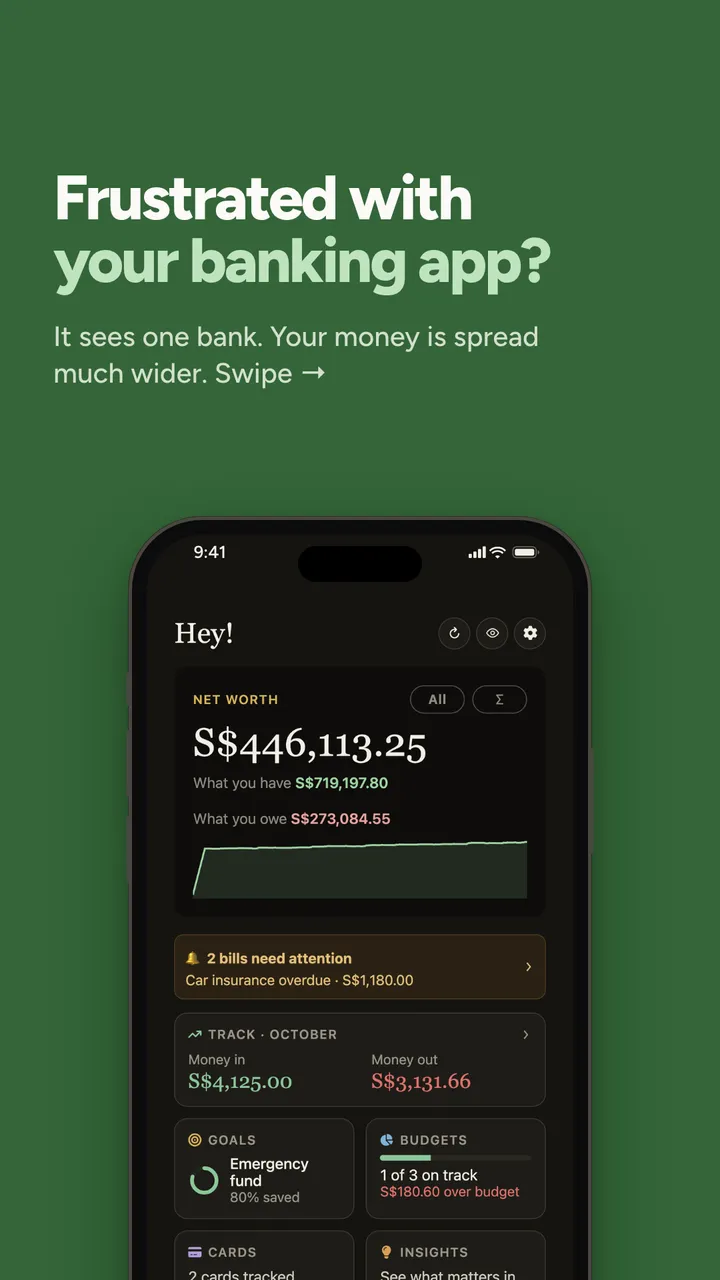
This isn't a complaint about banks. Their apps are built for paying, transferring and checking a balance, and they do those well. But each one can only see the accounts you hold with that bank. It has no way of knowing what's sitting next door.
And most of us in Singapore spread our money around. A salary account at one bank because the employer uses it. A savings account at another because the rate was better that year. A credit card from a third because a friend recommended it, or because of the luggage they gave away.
Here's a national number that gives you a feel for it. In the second quarter of 2026, MAS figures (published on data.gov.sg) show about 7.02 million credit and charge cards in Singapore: 6,151,986 main cards plus 863,831 supplementary ones. SingStat counts 3,457,500 residents aged 20 and above at the end of June 2026.
7,015,817 ÷ 3,457,500 = 2.03 cards for every adult resident.
That's a ratio, not a headcount. Some people hold five cards, plenty hold none, and some cards belong to people who aren't residents. MAS doesn't publish how many people hold a card. But two cards per adult tells you how many separate apps, statements and due dates are out there.
A worked example: what one app tells you
Say Wei Ling (an example, not a real person) has:
- a salary account at Bank A with $6,200,
- a savings account at Bank B with $18,000,
- a credit card at Bank C with $1,150 spent this cycle, not yet paid.
Open Bank A's app and it says $6,200. That's true, and it's about a quarter of the story. Her actual cash position across all three is:
$6,200 + $18,000 − $1,150 = $23,050.
And that's before her CPF, which is often the biggest pot of money a working Singaporean has, and her flat, which neither bank's app has ever heard of.
What this means for you
Make a list of every place your money sits. Not just bank accounts: every card, CPF, any investment account, your flat, any loan. When I first did this, I found an account I'd half forgotten. It was the sign-up-gift account, with a balance small enough to be embarrassing and big enough to be worth moving.
Cash flow is useful, but it isn't the full picture
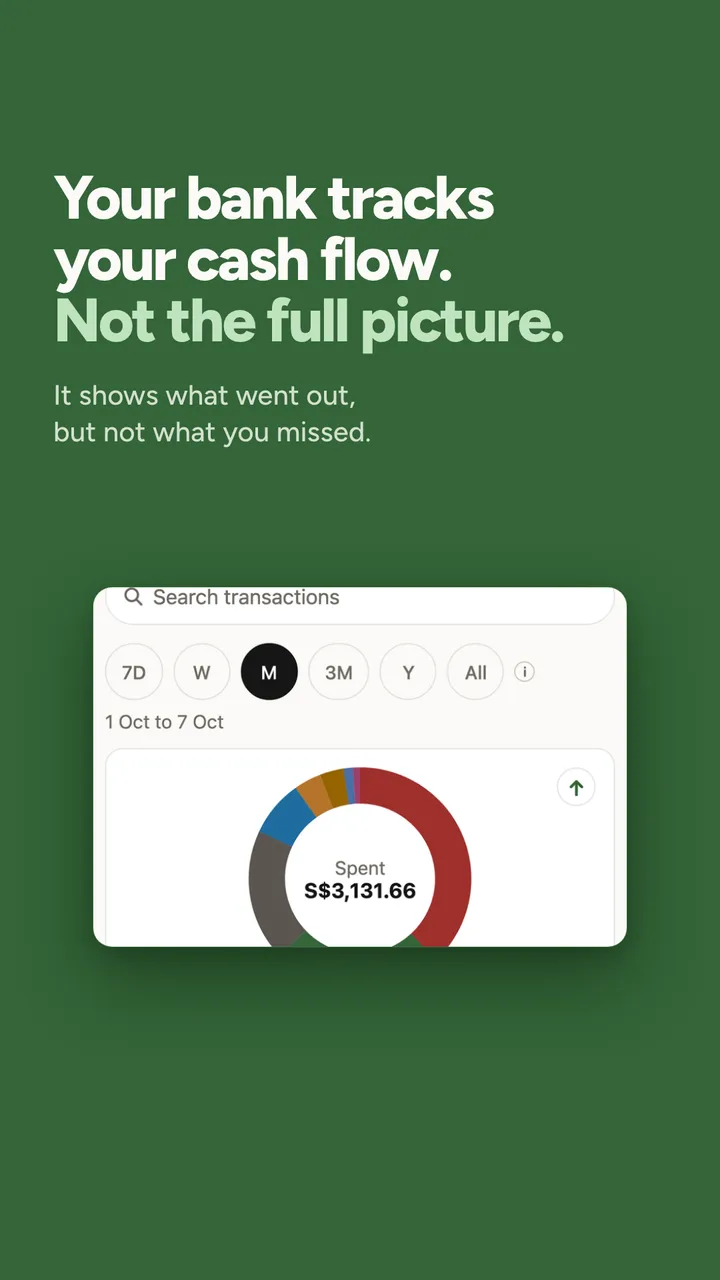
What a banking app shows you well is cash flow: money in and money out, at that bank, over a period. The slide shows a spending chart for the first week of October. That's a cash flow view, and it's genuinely useful. If you want to know whether your GIRO went through, or how much you spent on food this week, that's the right place to look.
But cash flow answers "what happened?" It doesn't answer "where do I stand?" For that you need a different measure: net worth, which is simply what you have minus what you owe, at a moment in time.
The two can point in completely different directions. Here's how.
A worked example: the month that looked bad but wasn't
Say Daniel (another example) earns $5,000 a month and has an HDB loan. Two things happen every month that his banking app gets only half right.
His home loan. His monthly instalment is, say, $1,400. His banking app shows $1,400 going out, and that's the end of the story as far as the app is concerned. But a loan instalment is two things: interest, which is a real cost, and principal, which reduces what he owes. If (in this example) $540 of it is interest and $860 is principal, then:
- Cash flow says: −$1,400.
- Net worth says: −$540, because he now owes $860 less than he did last month.
His CPF. For employees aged 55 and below, CPF contributions are 37% of wages: 20% from the employee and 17% from the employer (CPF Board's published rates). On $5,000, that's:
$5,000 × 37% = $1,850 into his CPF accounts this month.
His banking app never sees that money. His payslip mentions it once. But it's his, it earns interest, and it adds to his net worth every single month.
So in a month where Daniel's banking app shows him spending heavily, his net worth might still have gone up. And in a month where his bank balance looks healthy, he might have quietly built up a card balance at another bank. Cash flow on one bank can't tell you either.
What this means for you
Use your banking app for what it's good at: the last few transactions, did it go through, how much is in this account. Then, once a month, look at the whole picture somewhere else. If you want to see where your own CPF contributions go each month, our CPF calculator breaks it down by account.
Adding everything up into one net worth
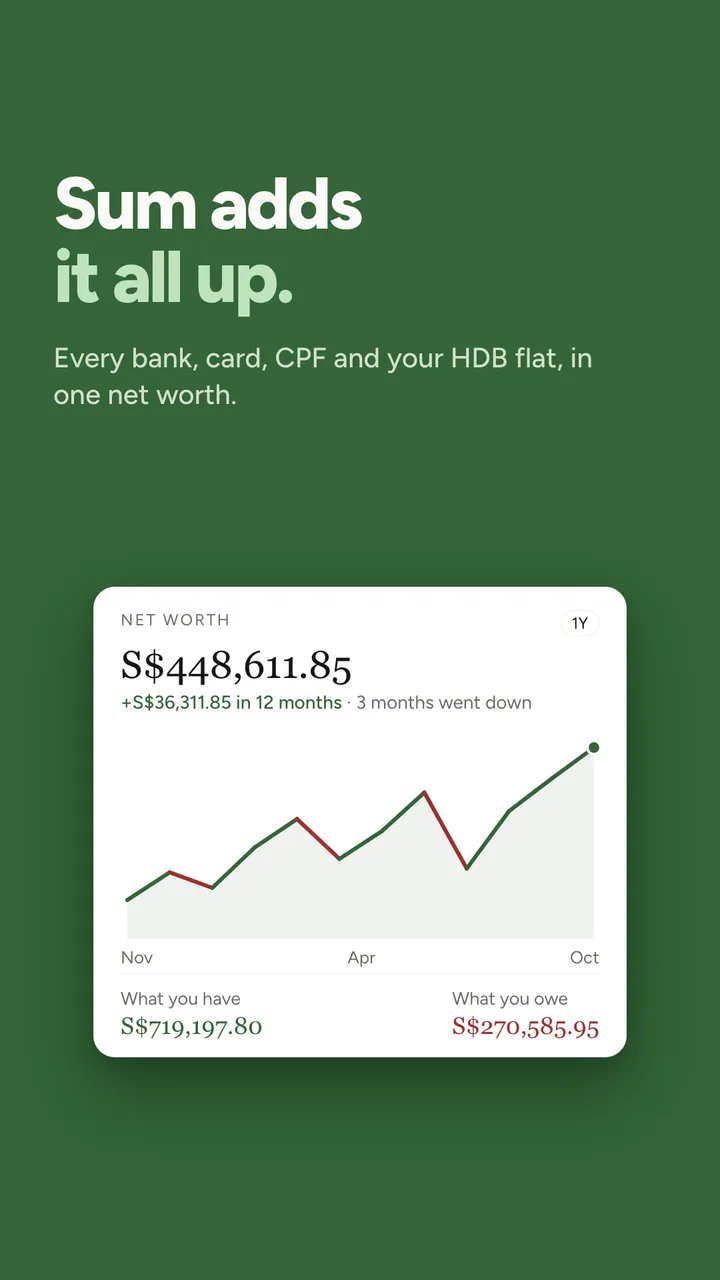
This is the gap we built Sum to fill. Instead of one bank's view, Sum puts every bank, every card, your CPF and your HDB flat into one number: your net worth.
Why does the flat matter so much? SingStat's Household Sector Balance Sheet for the second quarter of 2026 (released 25 Aug 2026) puts residential property at 42.3% of what Singapore households own. For every $100 households own, about $42 is the home. An app that leaves out the flat and the CPF is leaving out most of what many of us have.
A worked example: Wei Ling's whole picture
Back to Wei Ling. Say she also has $68,000 across her CPF accounts, owns an HDB flat she estimates at $480,000, and has $310,000 left on her home loan. Two columns:
| What she has | What she owes | ||
|---|---|---|---|
| Bank A | $6,200 | Home loan | $310,000 |
| Bank B | $18,000 | Card at Bank C | $1,150 |
| CPF | $68,000 | ||
| Flat (estimate) | $480,000 | ||
| Total | $572,200 | Total | $311,150 |
Net worth: $572,200 − $311,150 = $261,050.
Bank A's app said $6,200. Her net worth is about forty times that. Neither number is wrong; they just answer different questions.
Notice the line isn't smooth
The chart on the slide is sample data, but look at its shape: three of the twelve months went down. That's what a real year looks like. An insurance premium lands, a holiday happens, the aircon dies in the hottest week of the year. What you're looking for is the direction over twelve months, not any single month.
I used to update a spreadsheet once a year, the night before Chinese New Year. One data point a year tells you nothing about direction. Twelve tells you a lot.
What this means for you
When you estimate your flat, be realistic rather than hopeful, and use the same method every time so the trend is honest. Our HDB resale value tool gives you a starting point from recorded resales.
The cashback question your bank won't answer
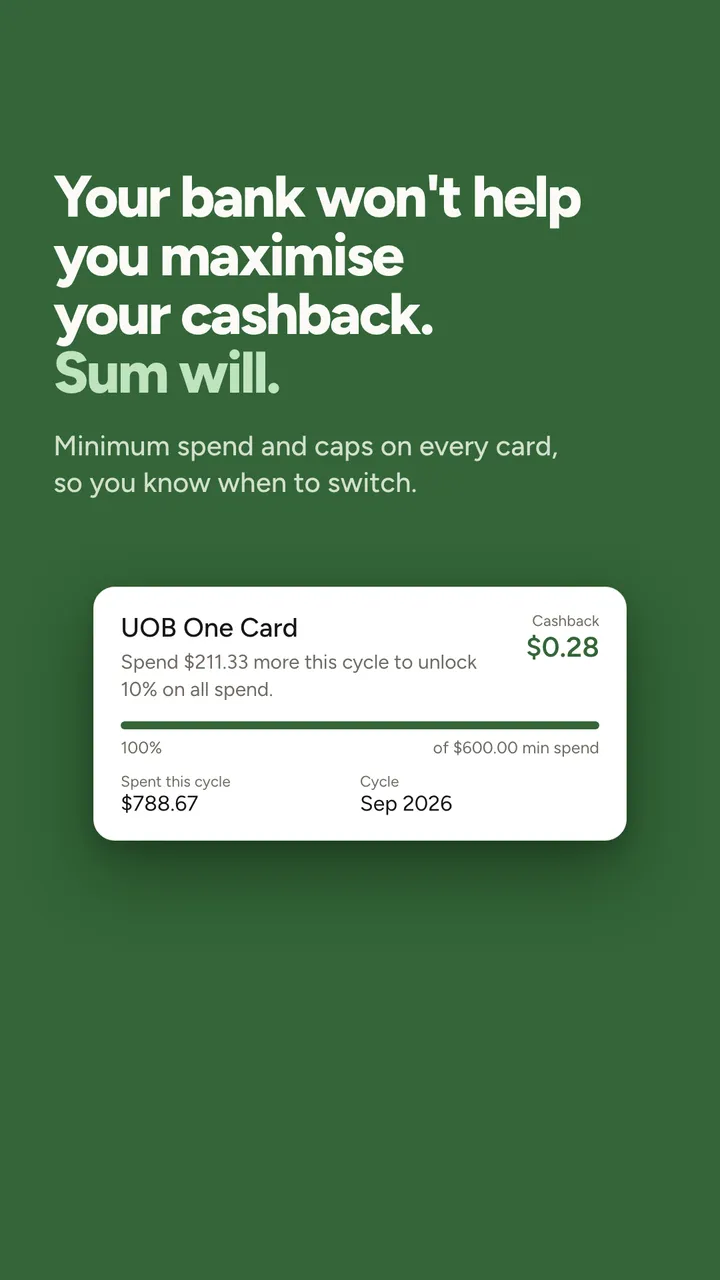
Many cashback and miles cards in Singapore come with two rules attached to the headline rate:
- Minimum spend: you only get the higher rate if you spend at least a certain amount in the statement month.
- Cap: the higher rate stops once you've earned a certain amount of cashback (or spent a certain amount) that month. After that, you earn a much lower base rate.
Your bank will happily show you what you spent on its card. What it won't say is, "You've hit the cap on this one, you might want to use your other card for the rest of the month." That would mean sending you to another bank.
A worked example: the cap I kept spending past
Here's a made-up card, typical in shape: 5% cashback on groceries, capped at $25 of cashback a month, and 0.3% on everything after the cap.
The cap works out to a spend level: $25 ÷ 5% = $500 of groceries. Say a household spends $700 on groceries in a statement month, all on that card:
- First $500 at 5%: $25.00
- Next $200 at 0.3%: $0.60
- Total: $25.60
Now say they have a second card that pays a flat 1.6% on everything, and they switch to it after hitting $500:
- First $500 on card one at 5%: $25.00
- Next $200 on card two at 1.6%: $3.20
- Total: $28.20
The difference is $2.60 that month. Small, honestly. But it repeats every month, it's similar on every capped category, and the only thing required is knowing when you crossed the line. Which, mid-cycle, is the one thing nobody shows you.
I'll own up to this one. For a good few months I kept using a capped card long after I'd maxed it, because I genuinely had no idea where I was in the cycle. I only noticed when I sat down with the statements and wondered why the cashback hadn't grown with my spending.
What this means for you
The "month" for minimum spend and caps is usually your statement cycle, not the calendar month. If your statement closes on the 25th, that's when the count resets. Check your card's terms for both numbers and for what's excluded from eligible spend. And if you're comparing cards before applying, our card rewards calculator applies the caps and minimums to how you actually spend.
Every bill, not just one bank's
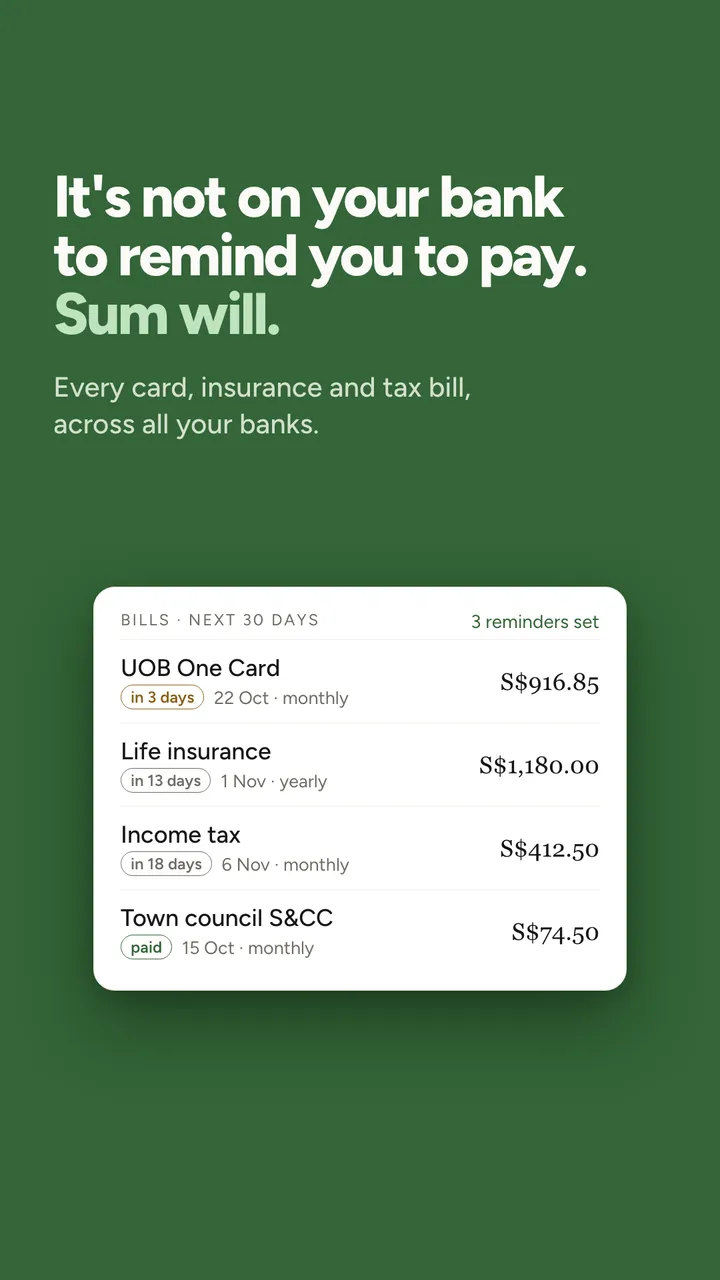
To be fair to the banks, they do remind you about their own card bills. What they can't do is remind you about the other bank's card, your life insurance premium, your town council charges or your income tax.
The sample on the slide has four bills in the next 30 days: a card bill, a yearly life insurance premium, a monthly income tax instalment and the town council's service and conservancy charges (S&CC, the monthly fee for cleaning and maintaining your estate). They're with four different organisations. No single banking app would show you all four.
Why income tax shows up as "monthly"
That income tax line is due on the 6th, monthly, and that's not a random date. IRAS lets you pay income tax by GIRO in monthly instalments, up to 12 months, and deducts them on the 6th of each month. If you don't use GIRO, your tax is due within one month of the date on your tax bill (the Notice of Assessment). Miss that and IRAS adds a 5% late payment penalty on the unpaid tax, with more possible if it stays unpaid.
A worked example: one month's calendar
Lay out a typical month for Wei Ling across her three banks:
| Date | Bill | Who sends it | Reminder from |
|---|---|---|---|
| 6th | Income tax instalment (GIRO) | IRAS | No one, it just goes |
| 15th | Town council S&CC | Town council | Paper or e-bill |
| 18th | Card at Bank C | Bank C | Bank C's app |
| 22nd | Card at Bank A | Bank A | Bank A's app |
| Once a year | Life insurance premium | Insurer | A letter, maybe |
Five bills, five sources, and the one most likely to be missed is the yearly one at the bottom, because a year is just long enough to forget it exists.
What this means for you
Make sure the account each GIRO comes out of actually has the money on that date. A GIRO that bounces because you moved your savings to another bank is a very Singaporean way to get a late fee. And write down every bill you pay in a year, not just the monthly ones. I counted them for an example household in too many bills and cards. It came to 13.
If you only remember three things
- Your banking app shows one bank's cash flow. Your net worth, what you have minus what you owe across everything, is a different and more useful number.
- Cash flow and net worth can move in opposite directions. Loan principal and CPF contributions are the usual reasons.
- Card caps and once-a-year bills are where seeing one bank at a time costs real money.
How I keep track of this
These days the Sunday-sofa routine is gone. I still use my banking apps every week, because that's where I pay and transfer. Sum doesn't replace them and can't: it's read-only. It can see balances and transactions, but it can never move money, make a payment or hold your funds.
What I use Sum for is everything I used to try to piece together across four apps:
- One net worth. My banks, cards, CPF and loans in one number, with the 12-month line. You can link up to two banks on the free plan, or import a PDF or CSV statement (or a screenshot of your banking app), and Sum reads your statement and sorts every line into a category.
- Card trackers. For each card: spent this cycle, how far to the minimum, and when the cap is reached. That's what finally stopped me spending past my cap. The card optimiser is on the free plan.
- One bill list. Every card, insurance and tax bill across all my banks, with a reminder before each one is due. I mark them paid as they go.
On the paid plans, Essential adds things like pulling in your CPF and HDB details automatically, net worth projections, the tax relief optimiser and unlimited bank links. You don't need any of those to see your whole picture for the first time.
If you'd like a walkthrough of getting set up, I wrote how to start tracking your expenses in four steps.
So, how many banking apps did you open this month? No judgement. I was at four, plus a CPF login, plus a spreadsheet. Now it's mostly one.
Talk soon, Brandon
Try the numbers yourself

Sum is launching in Singapore soon.
Your banks, cards, CPF and HDB flat, added up into one net worth. Statements sorted, card caps tracked, bills remembered.
Brandon · Finance team, Sum
Brandon is on Sum's finance team in Singapore. Brandon reads the CPF Board, IRAS and MAS updates so you don't have to, and turns our carousels into the longer version. Questions, corrections or something to share? Email Brandon at [email protected].
Got something interesting to share?
A money story, a question, something we got wrong, or a tip other Singaporeans should hear. Reach out to me at [email protected], or leave your email and I'll write to you.
Sources: MAS via data.gov.sg: credit and charge cards, 2Q 2026; SingStat: resident population by age, June 2026 (M810011); SingStat: Household Sector Balance Sheet, 2Q 2026 (released 25 Aug 2026); CPF Board: CPF contribution rates; IRAS: paying income tax by GIRO; IRAS: late payment or non-payment of individual income tax.
Any app screens shown use sample data, not a real person's. Sum is free to start; some features need a paid plan.
Information only, not financial advice.